

HMR is often treated as a development-server feature: detect a changed JavaScript module, send it to the application, and update whatever is currently rendered. NativeScript 9.1 takes a broader approach. The native runtime, module system, and framework can participate in the update lifecycle itself.
That requires more than fast recompilation. It requires native ES modules with stable URL identity, runtime module eviction and re-evaluation, framework-defined HMR strategies, propagation through the module graph, support for secondary JavaScript isolates, and native presentation targets that can remain part of the same running application. Put together, these pieces create a development model that is unusual in native app development: the running application becomes a live module graph that can be changed without restarting the native process.
The 9.1 announcement buries one of its most important lines about halfway down: “a framework strategy then applies the module to the live UI.” Most people will read straight past it. The module system got most of the attention, fair enough, but that sentence is the part worth exploring in practice.
If you have a framework, a renderer, a router, or anything else with opinions about what should happen when a module changes, you can write a strategy for it, plug it into @nativescript/vite, and let the dev loop on the device apply those semantics at runtime. I did this with Octane. The app is ns-octane, and the package behind it is @nativescript-community/vite-octane, a plugin for @nativescript/vite. The shape is something any framework can follow. Here's what a save looks like now:
[hmr-ws][update] kind=tsx file=/src/app.tsx await=0ms framework=70ms broadcast=14ms total=84ms
  [hmr][octane] accepted in place /src/app
  [ns-hmr-overlay] update stage=complete detail=Total 30ms
A native mobile UI inspired by the ChatGPT app, built with Octane, using new features with a realtime Vite enabled visual feedback loop.
What the runtime hands you
All of this sits on three rules from the 9.1 post. The resolver only compiles and registers, that's it. Module identity is the canonical URL, and it never changes. And if you want something fresh you evict it, there's no other way to get fresh. So if you're writing a framework strategy, those three turn into a pretty short list of things you can actually count on.
You can ask the registry things. ns:module gives you two calls, invalidateModules(urls) and getLoadedModuleUrls(). First one drops a canonical key and sets up a one-shot cache bust for whenever the next fetch happens. Second one tells you which modules this isolate has actually evaluated, and I mean actually, it's not guessing. I didn't appreciate that one at first, it took the worker script to make me appreciate it. Because that's how a strategy can tell the difference between a file changing that this realm never loaded, like a worker script, or a type-only module, and a file changing that live code is actually holding onto right now. Without it you're going off filenames. Which, no.
i is just JavaScript, and it keeps what you put in it. The dev server injects a hot context into every app module it serves, so createHotContext('/src/app'), keyed by the canonical id, and @nativescript/vite owns the whole surface, accept, dispose, prune, data, on, send, invalidate, all of it. The native runtimes have no hot API. None. And I think that's right, actually I'd go further than that, I think if a native runtime grew its own hot API that would be a mistake, because now you've got two places where policy lives. Runtime does the mechanics. Tooling decides what to do with them. The one to pay attention to here is hot.data. It survives re-evaluation as long as the key is the same, which makes it the only state that outlives a module instance, and two of the three things at the end of this post are built on, basically, nothing else.
The server tells you what changed and what it's connected to. When you save, ns:hmr-pending goes out first, and that's just a UX hint, it fires before any transform has even run. Then ns:hmr-delta, with the changed ids, their dependency edges, an 8-hex content hash, the graph version. No code goes over the socket. Ids and edges, that's it, and if someone wanted to change that it's the part I'd push back on hardest. The client keeps its own copy of the module graph with those edges in it, so when you ask "who imports the thing that changed" you get an answer right there on the device without a round trip.
And there's somewhere for you to plug in on both ends, and it's public. Server side it's FrameworkServerStrategy, so matchesFile, handleHotUpdate, the cache-invalidation hooks, import-map entries. Client side it's FrameworkClientStrategy, install, afterModuleReimport, refreshAfterBatch, plus four more that got added while I was doing this, beforeBatchEvict, shouldQueueReimport, applyUnqueuedChanges, handleGraphResync. The first three had been enough up until then. Anyway a flavor is a config helper and one strategy per side, and the framework registers it from its own package, like this:
import { registerFrameworkFlavor } from '@nativescript/vite/framework'

registerFrameworkFlavor({
  flavor: 'octane',
  server: octaneServerStrategy,
  client: '@nativescript-community/vite-octane/client',
})
The shared client does the protocol, the eviction, the re-import, the overlay, all the plumbing. What's left for the strategy is really just one question, which is, a fresh module body just showed up, what does that mean for the app that's already running?
And that's the whole job. Octane's compiler does more of it than I expected it to, so let's start there. Good sign for a compiler I think.
Octane's half: the compiler already did the work
When Vite's serving, Octane's compiler wraps every exported renderer-owned component and drops in the standard Vite accept wiring. Here's the tail end of /ns/m/src/app, exactly what the device gets:
export const App = __octaneUniversalHmr(
  'nativescript',
  __octaneDefineUniversalComponent(
    'nativescript',
    function App() {
      const [flame, setFlame] = useState(1, _h$0)
      // …
    },
    { module: '/src/octane/renderer.ts' }
  )
)
if (import.meta.hot) {
  import.meta.hot.accept((module) => {
    App[__octaneUniversalHmrSymbol].update(module.App)
  })
}
So hmrUniversalComponent hands you back a wrapper. The wrapper's render function just calls through to meta.component, and every time it renders it makes a note of which owner rendered it. Then update(next) swaps meta.component out for the new function, bumps a revision, and calls owner.root.schedule() on every owner it made a note of. The owners stick around through all that. And owners are where hook state lives. So useState survives, effects with stable deps don't re-run, and the re-render only sends host commands for the props that actually changed. Oh and hook slots use Symbol.for under HMR, because a plain Symbol() would be a new symbol every time the module re-evaluated. Small thing. Get it wrong and every hook loses its state on the very first save.
It's worth noticing where this lives, too. It's in octane/universal/native, the host-neutral runtime. This is not a DOM feature that happens to also work on a phone, and that distinction matters to me more than it probably should. And the driver, which is the part of ns-octane that turns create and update and insert commands into @nativescript/core views, has zero HMR code in it. As far as the driver's concerned a hot update is just another re-render.
So the runtime evicts and re-imports, the compiler emits the accept callback, the framework re-renders in place. You'd think there's nothing left for a strategy to do. I thought that for a while. Turns out there were five places where I actually had to make a call, and a couple of them I only found because I saved a file and, nothing. Nothing happened.
The five decisions
1. Which accept callback fires
In Vite, a module's accept callbacks belong to whichever evaluation is the current one. createHotContext clears them out, the fresh body registers new ones, and the next update calls the newest one with the namespace that's replacing it. The NativeScript hot registry does exactly the same thing. So Octane's first update is fine, the App wrapper from boot gets handed the second evaluation and passes it along. And if you only ever test one save, that's where you stop, everything looks great.
It's the second update where it breaks, and it took me longer than I'd like to admit to see why. The callback on file now belongs to the second evaluation. That callback closes over the second wrapper. And nobody ever rendered the second wrapper, because the entry imported App once, at boot, and that binding is the first wrapper, and the first wrapper is the one holding all the live owners. So the third evaluation gets handed to a wrapper that has no owners, it updates its meta, and nothing re-renders. Every edit after the first one just, doesn't happen. No error. Nothing. Honestly I'd rather it crashed.
And this isn't a NativeScript thing. You'd get it anywhere Vite clears callbacks and the framework's accept callback closes over a module-local binding. Octane's webpack dialect gets around it, there's an explicit handoff through hot.data. The vite dialect doesn't have that. I suspect the same thing happens on the web after the first edit, but that's for the Octane folks to look at, not me.
So what the strategy does is it anchors. Not a word I love for it, but it stuck. It grabs the accept callbacks from the first evaluation that registers any, and then it keeps firing those, with each new namespace, for as long as the module stays self-accepting. The anchors reset on a graph reload, they have to, because a reload re-evaluates the importer and now there's a new "first" wrapper. They also survive a save that throws before it gets around to registering anything. In that case the registry shows no callback, but the live wrapper's still sitting there untouched, so when you fix your typo the next save goes in place instead of dropping down to a reload.
// @nativescript-community/vite-octane, src/client/strategy.ts (abridged)
const anchors = new Map<string, HotCallback[]>()

function captureBeforeEvict(ids: readonly string[]) {
  for (const id of ids) {
    const key = hotKey(id)
    const current = registry.getAcceptCallbacks(key)
    if (current.length === 0) anchors.delete(key)
    else if (!anchors.has(key)) anchors.set(key, current)
    registry.runDispose([key])
  }
}
Now if your framework's accept callback goes off and looks things up in a global registry by component id, which is what Vue does with __VUE_HMR_RUNTIME__, and React Refresh does it, solid-refresh does it, then the anchor and the latest callback are the same thing and you never have to think about any of this. If it closes over a binding, you do. Most of them do the registry thing. Octane's closure approach is cleaner to read, and it's the one that bit me. Make of that what you will.
2. Dispose before eviction, accept after re-import
This one's short. The registry wipes a module's accept and dispose registrations the moment the fresh body evaluates, so the only time you can still get at the outgoing instance is before the eviction. That's what beforeBatchEvict(drained) is there for. The Octane strategy snapshots the accept callbacks and runs hot.dispose in there, then fires the snapshot later from afterModuleReimport(id, namespace).
Dispose, evict, re-import, accept. That's Vite's order, and if you keep to it then code the compiler wrote for the web just runs on the phone. I'd keep it exact even in the places where it looks like it doesn't matter.
3. What to do with a module that accepts nothing
Okay so say you edit src/theme.ts. Plain module, it exports a string, app.tsx renders the string. The fresh body doesn't register any accept callback. By the time anybody looks, the shared queue has already evicted it and re-imported it, so the runtime registry has the new instance, but app.tsx never re-evaluated, so it's still holding the old one. Screen doesn't change. Again.
Vite handles this with propagateUpdate, and the client graph has the edges to do the same thing here. You walk up through the importers. If an importer accepts the changed path by name, so hot.accept('./theme', cb), it takes the update and you don't need to re-evaluate it. If an importer accepts itself, that's a boundary, evict it, re-import it. Anything else, keep walking. And if you get all the way up to a module nobody imports, which means the app entry, that branch is dead.
[hmr][octane] propagation { boundaries: [ { kind: "self", key: "/src/app" } ],
                            evict: [ "/src/theme", "/src/app" ], dead: [] }
[ns-hmr-overlay] update stage=complete detail=Total 41ms
The dependency form of accept wasn't in the NativeScript registry before this. It is now. Probably should have been from the start, but nothing needed it until something did. Relative paths resolve against the owner's canonical key, and there's a reverse index, so an update can find its acceptors even when there's no import edge between the two modules in the graph. Hang onto that bit, it comes back in the worker example.
The walk itself is just a pure function over the graph, propagateToAcceptingBoundaries(changedIds, graph, { acceptsSelf, acceptsDep }). It runs before anything gets fetched, and the graph already has the new edges by then, so if the app can't absorb a change it goes straight to a reload, instead of evaluating the module once for nothing and then reloading anyway. The ten test cases for it run in milliseconds and I never have to touch a simulator to check them.
Testing this shook out two bugs, and neither of them is Octane's, so every flavor gets the fix.
- The server's shared prologue was reading a changed module's
importedModulesbefore it awaited the transform that actually finds them. So if you added an import it wasn't in the graph until the next save. It reads them after now. Turned out Vue's reverse-graph propagation had the same one-save lag. I don't think anyone had noticed, or they had and put it down to something else. getLoadedModuleUrls()is how you answer "is this id live in this realm", except membership comes and goes. A module isn't in the registry between when it gets evicted and when it gets re-imported, so ask at the wrong moment and you get the wrong answer. The strategy just remembers every key the realm has ever had.
4. Dead ends reload the graph, not the process
Now edit the driver. Every component imports the renderer, the renderer imports the driver, the entry imports both of them. Nothing accepts anywhere up that chain, so propagation comes back dead. And this is the second tier of freshness the 9.1 post was talking about:
[ns-hmr-overlay] update stage=rebooting detail=no accepting importer for /src/octane/driver
[ns-hot] full reload: evicted 9 modules, re-importing http://192.168.0.10:5173/ns/m/src/index.ts
[ns-hmr-overlay] update stage=complete detail=Module graph reloaded
The built-in handler for hot.invalidate() runs every hot.dispose callback, evicts every module the app owns, re-imports the entry. Running dispose there is new, the entry uses it to unmount() the roots it made. And when the entry re-evaluates and calls Application.run() again, that gets intercepted and turned into resetRootView, so there's no second native launch.
What doesn't get evicted is @nativescript/core, that's served once as /ns/core-bundle.mjs, and the vendor bundle, and any per-file vendor module. I found out where that line needs to be by crashing the app. An earlier version of the reload evicted /ns/core too, and then you've got two View class hierarchies in the same isolate, and the first new view fails instanceof View against the one the live tree was built with. And instanceof failing against a class that is, visibly, the same class, that's not a fun thing to sit and stare at. So a graph reload replaces what the app owns and nothing else.
Couple of related things. If saves come in while a reload's still evaluating, they get folded into one follow-up reload after it settles, rather than racing it. The reload finishing is a hot event now, ns:full-reload-complete, so a strategy can finish the overlay and whatever else it was holding off on. And a dev-server restart ends up going through the same reload. You edit Octane's renderer config, its Vite plugin restarts the server, the device reconnects and gets back a full graph where every single hash is different, and instead of re-importing modules one at a time, the strategy's handleGraphResync just says, give me one ordered reload.
5. The server must purge before it broadcasts
The device applies an update by re-fetching the changed module. And the dev server caches transforms, there's a 60-second shared cache sitting on top of Vite's own, which, I have mixed feelings about that one. If the delta goes out before those caches get purged, the re-fetch hands back the previous save's body and what's on screen is one save behind. React hit this. Then Solid hit it, separately. By the time I got to Octane I knew to look for it, which is the only reason this is a paragraph and not a whole section. The Octane server strategy is just the TypeScript one with deferDeltaBroadcast: true and a tail on the end that purges, re-transforms, re-reads the dependency edges, and only then sends the delta out.
And that's the strategy. Three files, about five hundred lines if you count comments, and it depends on @nativescript/vite rather than living inside it. Only the first decision actually knows anything about Octane. The other four are just Vite's contract written down for a native host, and whoever does the next framework can follow it.
Three things that were not possible before
For each one I'll go through what you do, what happens, what in 9.1 makes it work.
1. The native vocabulary grows while the app runs
@nativescript-community/octane's driver turns a JSX tag into a view class by looking it up in a registry, that's src/elements.ts. So make that registry a hot module:
export const ELEMENTS: Map<string, ElementConstructor> =
  import.meta.hot?.data.elements ?? new Map()

export function registerElement(tag: string, element: ElementConstructor) {
  ELEMENTS.set(tag, element)
}
for (const [tag, element] of BUILTIN_ELEMENTS) registerElement(tag, element)

if (import.meta.hot) {
  import.meta.hot.data.elements = ELEMENTS
  import.meta.hot.accept()
}
The Map lives in hot.data, so across re-evaluations of this module it's the same object every single time, not a copy of it. The driver imported that object at boot and it never looks anywhere else. Save elements.ts and the map gets filled back in, in place. The module accepts itself, so propagation stops right there and nothing above it gets touched.
Now write a new element. Not a plugin, no Swift, just a TypeScript class that talks straight to the platform:
export class Embers extends View {
  createNativeView() {
    const view = UIView.new()
    const emitter = CAEmitterLayer.layer()
    emitter.emitterShape = kCAEmitterLayerLine
    emitter.renderMode = kCAEmitterLayerAdditive
    const cell = CAEmitterCell.emitterCell()
    cell.contents = sparkImage().CGImage
    cell.velocity = 90
    cell.emissionLongitude = -Math.PI / 2 /* … */
    emitter.emitterCells = NSArray.arrayWithObject(cell)
    view.layer.addSublayer(emitter)
    return view
  }
}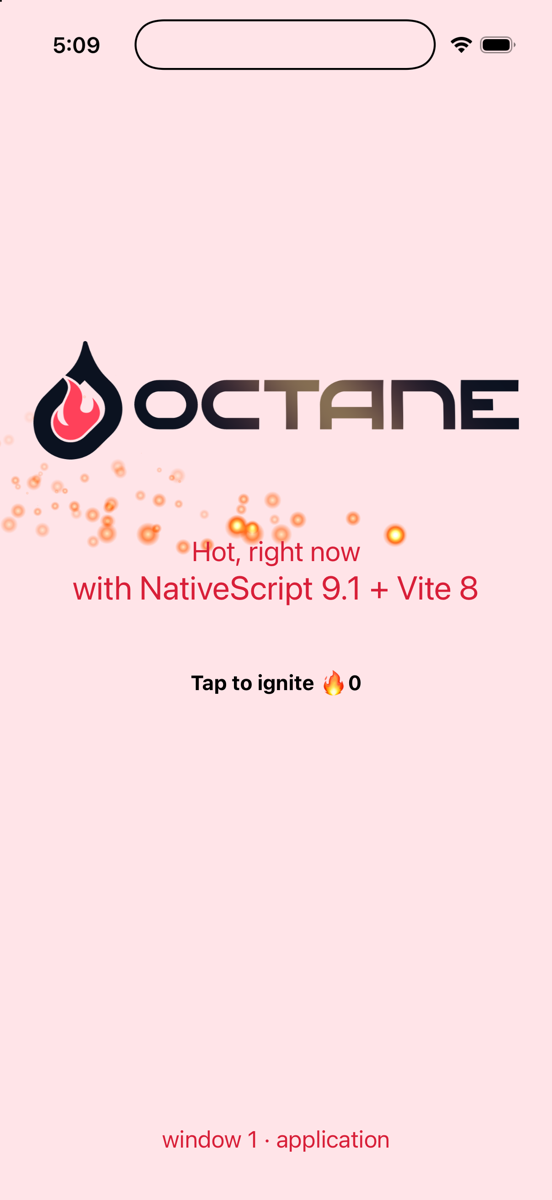
The 9.1 feature this rests on might be the smallest one in the whole release. hot.data persists under a canonical key, the key never changes, so the registry object and the driver's reference to it are the same thing before and after. And underneath that is the thing NativeScript has always had, which is that CAEmitterLayer is a JavaScript constructor. You just call it.
In React Native and Expo, a genuinely new native UI primitive means crossing the native boundary: a Fabric Native Component, a typed spec/codegen, native implementation, and eventually a native build. Fast Refresh is fantastic for iterating on the JavaScript around that component, but it doesn't replace the native build when the native implementation itself changes. Lynx takes a different approach: its element model is intentionally backed by native rendering primitives, with custom native elements still requiring native implementation. Capacitor goes the other direction: the UI is fundamentally DOM/web UI, with native capabilities exposed through compiled plugins.
NativeScript's advantage here comes primarily from its runtime architecture and direct native API exposure; 9.1's module mechanics then allows that runtime capability to become part of the development loop.
One more thing on this one. If you go edit embers.ts after that, the change reaches elements.ts through propagation, 35 milliseconds, and registerElement can see it's replacing a class rather than adding a new one. The driver listens for that and recreates every live instance of the tag right where it stands, a fresh native view takes over the node's props, its listeners, children, position, and the component tree above it never finds out. Change cell.scale, the sparks on screen change size, and the burst counter next to them still says 3.
2. A hot update crosses the isolate boundary
Note: See this example in the feat/swift-ui-example branch of ns-octane project.
There's a Worker computing an intensity curve, about 30 frames a second, posting each value over to the main realm, and the component pushes it straight into the shader's uniform and into the embers' heat, through refs. Per-frame values never go anywhere near component state, so the breathing costs no re-renders at all. The worker script is src/flame/flame.worker.ts.
A worker script is the one kind of module the main realm must never, ever re-import. Its body calls postMessage on a worker scope and starts timers. And nothing imports it either, the spawner refers to it by URL, so there's no import edge in the graph at all. On the web, Vite's answer to this is a full page reload, which is a reasonable answer for a browser and a bad one for a phone. Here the spawner takes ownership of it instead:
if (import.meta.hot) {
  import.meta.hot.accept('./flame.worker', () => void respawn())
  import.meta.hot.dispose(() => worker?.terminate())
}

async function respawn() {
  const outgoing = worker
  const state = outgoing ? await handoff(outgoing) : undefined // { phase, frames }
  outgoing?.terminate()
  worker = spawn(state) // fresh isolate, fresh script, resumes mid-breath
}
So the strategy sees the changed id, asks getLoadedModuleUrls(), finds out the main realm never evaluated this thing, and skips the queue. Then it looks up the dependency acceptors for that path, and flame.ts is one of them. Its callback asks the old worker for its state, that comes across as a structured clone between isolates, using the serializer that postMessage and structuredClone share as of 9.1. Then it kills the old worker, spawns a new one, and the new one picks the curve up right where the old one left it:
[hmr-ws][update] kind=ts file=/src/flame/flame.worker.ts … total=63ms
[ns-hmr-overlay] update stage=complete detail=Accepted by importer: /src/flame/flame.worker
[flame] worker respawned from frame 437
The 437 is just wherever it was.
The new isolate fetches the script over HTTP, fresh, because nothing in its registry was ever stale in the first place. Each isolate gets its own loader snapshot, a worker inherits its parent's import map when it spawns, and that's why a fresh worker is the right unit here, rather than trying to swap something out inside the old one. The session also keeps track of every Worker that gets constructed, so a reboot cleans up any that the app forgot about.
Elsewhere. React Native doesn't provide a built-in browser-style Worker primitive. A normal React Native app has a primary Hermes JavaScript runtime; libraries can create additional runtimes or threads, but those are additional infrastructure rather than a Worker model inherently managed by Fast Refresh. Fast Refresh understands the React Native module/component graph—it doesn't automatically own the lifecycle or module graph of an independently running JavaScript runtime.
Lynx takes a different approach: it has a framework-managed dual-thread architecture, with JavaScript running on both the main and background threads. Developers can explicitly run code on that background thread, but the runtime and thread lifecycle are part of Lynx's framework architecture rather than a general-purpose Worker primitive that the application creates and manages.
Capacitor inherits the WebView's Web Worker model, and Vite knows how to bundle Workers as separate execution contexts. But Worker HMR isn't simply the same thing as React Fast Refresh: when HMR isn't handled, Vite falls back to a full reload, and a state-preserving Worker update requires explicit lifecycle and HMR handling.
That's where this gets interesting. To hot-update code executing in a separate JavaScript runtime while preserving its state, you need more than file watching. Something has to own the worker/runtime lifecycle, communicate across the runtime boundary using values that can be cloned or transferred, preserve and restore the execution state you care about, and route a changed module to the correct running execution context—even when that context isn't represented by the ordinary importer graph of the main application.
Miss any of those pieces and you don't have true stateful HMR for the secondary runtime; you have a restart.
3. One save, every window
9.1 made NativeWindow a cross-platform primitive. Windows have roles now, application, embedded, carplay, externalDisplay, and there's a content resolver that hands each window its UI when it asks for it. So give every window its own Octane root:
function createWindowContent(window: NativeWindow | undefined): Page {
  const page = new Page()
  roots.set(
    window,
    renderNativeScriptApp(page, App, {
      windowRole: window?.role ?? 'application',
      windowIndex: Math.max(1, Application.getWindows().indexOf(window) + 1),
    })
  )
  return page
}

Application.setWindowContentResolver(({ window, isPrimary }) =>
  isPrimary ? undefined : createWindowContent(window)
)
Application.run({
  create: () => createWindowContent(Application.primaryWindow),
})
On an iPad with UIApplicationSupportsMultipleScenes turned on, Application.openWindow() opens a second scene and the resolver hands it a second root, rendering the same App. Now edit app.tsx. One save, one eviction, one accept:
[hmr][octane] accepted in place /src/app
[app] render window 1 (application)
[app] render window 2 (application)
[ns-hmr-overlay] update stage=complete detail=Total 26ms
Both windows re-render off the one update() call. hmrUniversalComponent records owners per root, and every root that ever rendered the wrapper is in that set. There is nothing about windows in the strategy. And the same thing would reach a CarPlay scene, or an external display, the moment a resolver hands them a root. It's one module, you evict it once, and everything that was using it picks up the new one. Both windows, CarPlay, whatever. I didn't do anything to make that work, it's just what you get when a module's identity is a URL.
React Native's fundamental rendering model is organized around React roots and Fabric surfaces. It can be extended to support multiple native scenes and external displays, but those scenarios require additional native integration. CarPlay is an even clearer example: its UI is Apple's native template system, not a React Native surface. Expo can expose that functionality through native modules.
Lynx has its own framework-managed rendering and multithreaded runtime model, while Capacitor's normal application UI is a WebView, with native capabilities exposed through plugins.
The useful abstraction here isn't simply "multiple screens". It is treating each native presentation target as a first-class content target within the same JavaScript runtime: the same module identity, the same application state, and the same module graph can drive different native windows or displays.
That's the idea behind NativeWindow in NativeScript 9.1: make the native window itself part of the runtime model, rather than treating additional displays, scenes, or windows as special native escape hatches outside the normal JavaScript application model.
What this does for an agent
Here's why I think this matters beyond just having a nicer save loop. NativeScript has had a fast save loop for years, webpack HMR and then Vite, so the speed isn't the new part. What was missing for a coding agent is that the loop was opaque. The log said an update applied, and that was about it. Whether it went in place or reloaded the graph, whether state survived, when the screen was actually current, all of that was a screenshot. And a module that threw on evaluation took the process with it, so the agent was relaunching instead of saving again. With the loop above, the feedback is structured text it can actually read, and it tells you which tier applied and when the screen is current. This is the loop I used for every example in this post.
- Write the file. The server prints one summary line per save,
kind,file,frameworkandbroadcasttimings. If there's no line at all, the file's outside the HMR scope, which is useful to know in itself. - Wait for the device line. Either
[hmr][octane] accepted in place, or apropagation {…}record, orstage=rebooting. That tells the agent which tier applied, in place, through a boundary, or a full graph reload, before it goes and spends a screenshot finding out.stage=complete detail=Total Nmsis the moment the screen is actually current. An app can hook that same moment from the inside withonHmrUpdate(handler, id), that's in@nativescript/vite/hmr/shared/runtime/hooks. - Read the screen, then look at it.
idb ui describe-allgives you the accessibility tree. If there's aStaticText 'Tap to ignite 🔥 3'in there, then the label updated and state survived, and you know both of those without a screenshot.xcrun simctl io … screenshotis for the stuff a tree can't tell you, like whether the sparks look right. - Failures are just data. Under the 9.1 error model, a module that throws on evaluation is a reported
errorevent, not a dead process. The live tree keeps running the previous revision, the log says which module failed and why, and the next save retries under the same canonical URL. So the agent fixes it, saves again. Nothing to relaunch.
If I had to point a framework author at one part of all this, it'd be the tiers. The tiers, not the timings. The timings are nice but the tiers are what let you plan. An agent that knows a .tsx save goes in place, and a util save propagates, and a driver save reloads the graph, can pick where to make a change based on how much state it wants to hold onto. And it can tell from one log line whether it got what it was expecting.
Adding your own flavor
If you maintain a framework and you want this on NativeScript, you don't need a PR into @nativescript/vite and you don't need the @nativescript scope. @nativescript-community/vite-octane is the shape your own package can take and the framework-flavors guide goes through all of it, but here's the short version:
Config. A helper that registers the flavor, wraps baseConfig({ mode, flavor }), and adds your Vite plugin. Octane's is twenty lines:
import {
  baseConfig,
  getTypeCheckPlugins,
  registerFrameworkFlavor,
} from '@nativescript/vite/framework'

registerFrameworkFlavor({
  flavor: 'octane',
  server: octaneServerStrategy,
  client: '@nativescript-community/vite-octane/client',
})

export const octaneConfig = (
  { mode },
  options: OctaneConfigOptions = {}
): UserConfig =>
  mergeConfig(baseConfig({ mode, flavor: 'octane' }), {
    plugins: [
      ...getTypeCheckPlugins('typescript', options.typeCheck),
      ...octane(options.octane),
    ],
  })
and the app's vite.config.mts becomes:
import { octaneConfig } from '@nativescript-community/vite-octane'
import { nativeScriptRenderers } from './src/octane/config'

export default defineConfig(({ mode }) =>
  octaneConfig({ mode }, { octane: { renderers: nativeScriptRenderers } })
)
Server strategy. Spread typescriptServerStrategy, set flavor, set deferDeltaBroadcast: true, write the purge-then-broadcast tail from decision five. If your framework needs some transform that Vite's plugin doesn't do for the device, that's transformNodeModule or rewriteServedModule.
Client strategy. This is the file you'll actually spend your time in. It's a plain ESM module the device fetches from your package, written against @nativescript/vite/hmr/client/framework.js. Implement install, then go through the five decisions for your own framework, which callback fires, when dispose runs, how a non-accepting change propagates, what a dead end does, what "applied" looks like on the overlay. From the registry you get getAcceptCallbacks, getDepAcceptors, acceptsDep, runDispose, requestFullReload and hot.data. From the runtime, getLoadedModuleUrls. From the queue, beforeBatchEvict, shouldQueueReimport, applyUnqueuedChanges, afterModuleReimport, refreshAfterBatch, handleGraphResync.
Declare it. Put a nativescript.vite block in your package.json, { "flavor": "octane", "config": { "import": "octaneConfig", "from": "@nativescript-community/vite-octane" } }. That's what lets npx nativescript-vite init scaffold the config, and it's how flavor detection finds you.
Test the propagation walk at your desk. It's a pure function over a Map<id, { deps }>. Octane's has ten cases, they run in milliseconds, and the strategy itself gets tested against the real hot registry under Node. Save the device for the five saves that actually matter, component, dependency, worker, registry, entry, and for watching the counter survive all five. Do the worker one last. It's the one that finds things.
Try it
git clone https://github.com/NathanWalker/ns-octane && cd ns-octane
npm install
npm run ios      # ns debug ios
# or:
npm run android   # ns debug android
Then open up src/app.tsx, change a string, watch the line come in. After that, open src/octane/elements.ts and teach it a new tag.
The whole reason the module system got rebuilt in 9.1 was so any device stops being this special case. Vite thinks a module is a URL and thinks fresh means somebody sent you a message. Fine. Now the device thinks that too. Octane's the first framework to land using this third party approach. And getting from "the compiler emits i" to "it works on an iPad with two windows open" turned out to be five decisions, no new runtime features, and one community package that isn't part of @nativescript/vite at all. Drop in the NativeScript community on Discord and continue elevating this discussion.